For Windows 10 and 11, 64-bit · Mac: not yet · The sketch plays right here in your browser, no download needed
Free demo or full studio
Free demo
Full studio
Sounds
10
378
Scenes
Basic shapes
60 arranged scenes
Colliders · emitters
6 · 1
62 types · 8
Song studio, saving, recording
No
Yes
Time limit
None
Lifetime key, or 3 months
Price
Free
US$100 lifetime or US$30 for 3 months, once
SoundboxFountain plaza · actual footage, muted
Soundbox SKETCHSESSIONCascade01
SOUNDBOX / AQUATIC SERIESPlay the unexpected.
ORGANIC MOTION ∞ POSSIBILITIES
●READY
PLAY ITKEYS 1–4
0 particles · 0 voices · 0 hits
Sound is off · press Play sound to beginMASTER SKETCH 2.2
An interactive illustration with two browser voices. The real studio is shown in the tour and screenshots below.
PHYSICS YOU CAN PLAY✦SAMPLE YOUR WORLD✦HAPPY ACCIDENTS INCLUDED✦FROM LOOP TO SONG
IT’S EASY · THREE STEPS TO YOUR SOUND
Imagine it. Bounce it. Hear it.
Part playground, part sound studio. All the structure you need to finish a song, and all the freedom you want to get happily lost.
STEP 01 / SET IT IN MOTION
Build your own instrument.
Arrange glossy colliders from 62 types, set them sliding, orbiting or swinging to the beat, aim up to eight emitters, and send particles flying through portals, gel trampolines and gravity fields. True bounces, rolling and gusty wind turn every collision into a note.
STEP 02 / DISCOVER YOUR SOUND
A whole world of sound.
Explore 378 sounds, from watery chimes and pearl keys to chiptune leads, retro desktop dings and a glossy drum kit, all a search away in the sound browser. Import your own audio, capture it live, and slice it into something brand new.
STEP 03 / MAKE IT A SONG
From loop to song.
Write beats, melodies and chords with any sound, stack arrangements for drums, harmony and hooks, then save your session, record the master mix to WAV or export MIDI.
NOW PLAYING · THE OFFICIAL 2.2 TOUR
Sit back. Enjoy the tour.
A 1:42 trip through the real Soundbox 2.2, from its desktop themes and dark mode to scene effects, lights and Song studio, with a soundtrack that comes straight from the app’s own master output.
Soundbox Playersoundbox-tour-2.2.0.mp4 · 1:42
PLAYLIST · 12 CHAPTERS
2.2 footage: recorded in the 2.2 development preview at 30 frames per second, before the 2.3 preview’s new sounds, colliders, motion and effects, which the screenshots below show. Every sound comes from Soundbox itself, with no microphone, system audio or added music. The full studio requires a license; the free demo has ten sounds and five basic shapes.
Read the tour transcript (2.2 footage)
0:00 — Play the unexpected.
Startup daydream in the new Aero Gel theme, with a bubble swarm and screensaver ribbons.
0:08 — Pick your desktop.
14 interface themes restyle the whole studio: Classic Glass, Deep Aquarium, Liquid Chrome and more.
0:16 — Good night, glass.
Dark mode for every theme; the 13 theme backgrounds turn to night.
0:24 — Water, bubbles and a little magic.
Dolphin lagoon: a liquid pool with leaping dolphins. Ten scene effects live on the FX tab.
0:33 — Turn on the sunshine.
Glass garden: scene lights, a swaying meadow and butterflies.
0:41 — Every bounce rings true.
True bounces, rolling and spin. Time scale slows the whole world down.
0:49 — Any sound. No collider required.
Song studio: instrument tracks, step melodies and chords from the 110-sound library.
0:57 — Fresh studio tools.
Euclid rhythms, humanize and a metronome. Export MIDI when the song is done.
1:05 — Make yesterday’s sound new.
Capture the master output, audition slices and add them as instruments.
1:13 — Every instrument. Its own space.
Mix level and pan for each collider, then choose a reverb space.
1:21 — Keep the happy accidents.
Save a scene to My presets. Export a portable project with its audio.
1:30 — Every note lands on time.
Link the playground to the song: each note lands on its collider as it sounds. Soundbox 2.2.
The studio also supports imported sample pools, granular sampling, live input, MIDI output and reusable sound presets. External input and MIDI devices are not connected in this recording. Built-in tours and confirmed resets help you explore safely.
WHAT YOU GET IN SOUNDBOX 1.0
More to hear. More to bounce.
268 new sounds, 35 new colliders that can move on their own, eight effects that join the physics and 22 new scenes, drawn by your graphics card when it can. All of it is in Soundbox 1.0, alongside everything from earlier versions. Read the 2.3 notes
Fountain plaza
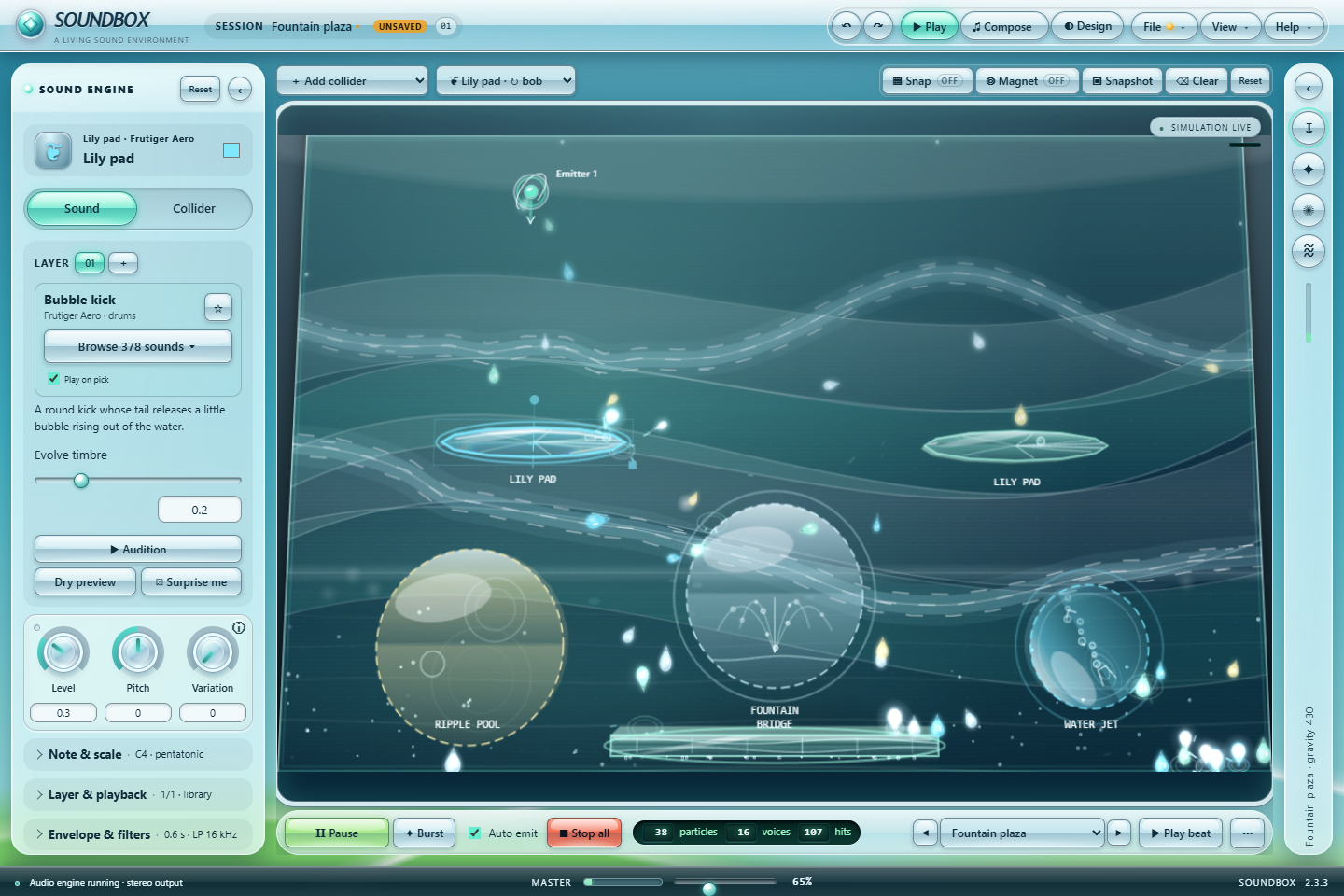
A plaza fountain and a water jet toss droplets between bobbing lily pads while air streams carry the spray.
FRUTIGER AERO · 94 BPM · Aero jet streams · Lily pads bobbing on the beat
Kelp forest
Kelp sways, koi sweep and drifting bokeh nudge a slow cloud of bubbles toward a dew magnet.
FRUTIGER AERO · 74 BPM · Lens bokeh · A swinging soap film
CRT arcade
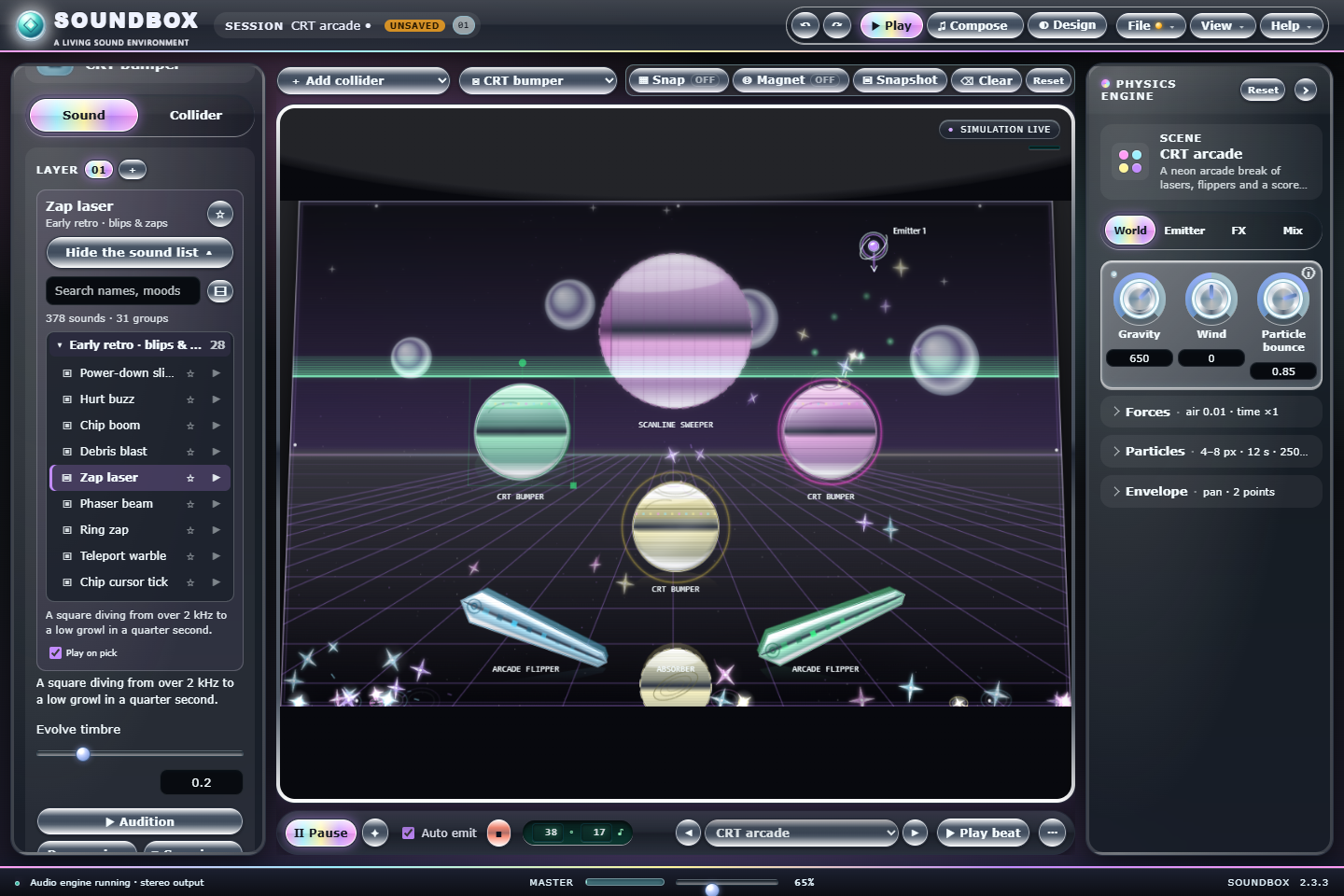
Phosphor bumpers and beat-timed flippers under a rolling scan field, with a drain that costs you the ball.
EARLY RETRO · 139 BPM · CRT scan field · Arcade flippers
Classic desktop shuffle
Window frames, a progress bar and a recycle bin click through a desktop of magnetic icons.
RETRO DESKTOP · 117 BPM · Desktop icons · A recycle bin
01 / 378 SOUNDS
Three new banks. One browser.
268 new original sounds: Aero water, glass, gel and birdsong; early retro chiptune leads, FM bells, noise drums and floppy seeks; and Y2K desktop startups, dings, dial-up chirps and pocket ringtones. Browse opens all 378 by bank and category, with search, favorites, recently used and a quick listen.
02 / 62 COLLIDER TYPES
Shapes with ideas of their own.
35 new types in three families. Gel trampolines, water jets, soap films, kelp beds and koi ponds; pixel staircases, CRT bumpers and arcade flippers; floppy slots, progress bars, recycle bins and a dial-up spiral. Every one is animated, on every finish.
03 / COLLIDER MOTION
Colliders that dance.
Make any collider slide, orbit, spin, bob, swing or patrol, at its own speed or in time with the song. Particles ride moving colliders and get flung off them, and dragging one while the scene plays pushes particles aside instead of popping them through.
04 / PHYSICAL EFFECTS
Eight new effects that push back.
Aero jet streams, Lens bokeh, Pixel snow, a CRT scan field, a Warp grid trampoline, Desktop icon magnets, a Tide surge and Cursor trails. Switch on Effects move particles and they carry, lift, knock and bounce the particles. The FX tab groups all 18 effects by theme.
05 / GPU STAGE
Drawn by your graphics card.
With hardware-accelerated WebGL2, the graphics card draws the playground. GPU visuals add refracting glass colliders, soft-shadow lighting, bloom, color grades and shader backgrounds; Off keeps the classic look, and Compatibility keeps the Canvas 2D stage. Graphics settings never change how particles move or sound.
06 / 22 NEW SCENES
60 ways to begin.
From Fountain plaza and Sky dock to Pixel castle, CRT arcade, Dial-up handshake and Millennium trance: 22 new factory scenes, each with its own groove, look and new sounds, most with moving colliders or new effects. The preset menu is grouped and searchable.
Also in 2.3: the master level goes up to 200% (up to 100% nothing changes; above it the level rises evenly to +15 dB while the limiter keeps it clean), .soundbox project files get their own glossy Aero Gel icon and open with a double-click, a ⚙ Settings dialog, grouped and searchable Add collider and preset lists, and up to 20,000 particles. Soundbox keeps itself up to date through its own signed update check.
SINCE 2.2 · FOURTEEN DESKTOPS
Pick a desktop. Watch it come alive.
Fourteen whole-interface themes after the desktops of the early 2000s, a dark mode for every one of them, and scenes that sparkle with water, bubbles, critters and light. See everything that’s new
Aero Gel
Sky, water and glossy gel.
New default · Sky glass · Water droplet
Glass Console
The original Soundbox 2.1 look.
Aqua waves · Pearl
Classic Glass
Late-90s bevels with a glassy twist.
Classic desktop · Desktop icons
Meadow Blue
Rounded blue title bars and a green go button.
Rolling hills · Flower petal
Pinstripe Gel
Lickable aqua buttons on pinstripes.
Aqua swirl · Gel drop
Brushed Steel
Brushed metal and a glowing display.
Spectrum display · Mini disc
Aurora Glass
Tinted glass frames over an aurora.
Aurora glass · Light orb
Media Lounge
Royal-blue media center with green orbs.
Media flow · Music note
Platinum Bubble
Platinum gray with ridged title bars.
Bubble horizon · Y2K charm
Candy Plastic
Translucent fruit-colored plastic.
Jelly float · Jelly bean
Liquid Chrome
Y2K chrome, holograms and star sparkles.
Chrome grid · Chrome star
Deep Aquarium
Under the sea: reef, fish and light shafts.
Coral reef · Tropical fish
Eco Garden
Fresh leaves, dew drops and sunshine.
Leaf garden · Leaf
Pocket LCD
A handheld organizer with an olive screen.
Pixel land · LCD pixel art
In the studio, a theme restyles everything: title bar, panels, buttons, knobs, dialogs and scrollbars, plus its own playground background, particle symbol and collider finish. Here, Try this theme dresses this website in its colors and background. Hover a card to watch it move.
01 / DARK MODE
Good night, glass.
Every theme and palette has a night side: Off, On or Match my computer, or one click on ☾ Dark in the status bar. Surfaces sink into calm, low-glare tones, accents keep glowing, and the playground brings out moons, stars, fireflies and a backlit LCD.
02 / SCENE EFFECTS
Water, bubbles and a little magic.
18 living effects on the FX tab: a glossy liquid pool, hit ripples, a soap bubble swarm, koi, butterflies and leaping dolphins, plasma links, gel blobs, a swaying meadow, glowing mist, glass shine and screensaver ribbons, plus eight more that push particles around. Let them push and carry particles too, if you like.
03 / SCENE LIGHTS
Turn on the sunshine.
Place up to eight glow orbs, stage spots, sunbeams and disco prisms. They cast soft shadows, put rim light on colliders, sparkle on passing particles, flare on hits and pulse with the beat.
04 / REAL PHYSICS
Every bounce rings true.
Colliders keep their own bounce and friction, rebounds match their setting, and nothing slips through a thin edge. Particles roll, spin and curve through gusty wind, so every scene plays a little more like the real world.
05 / LINK PLAYGROUND 1:1
Every note lands on time.
Play your song and each note sends a particle on a clean arc. It touches its collider as the note sounds, within about two thousandths of a second, so the playground dances right on the beat.
06 / STUDIO & SOUND
Fresh tools, warmer rooms.
Solo, Euclid rhythms, humanize, tap tempo, a metronome, count-in and MIDI export in Song studio. New reverb spaces from Glass hall to Cathedral, softer soft hits, a gentle look-ahead limiter on the master and, in 2.3, a master that goes up to 200%.
SONG STUDIO · FROM LOOP TO SONG
Make music. Not just noise.
Song studio is a real music maker: instruments, melodies, chords and stacked arrangements, with 378 sounds to play, from shiny early-2000s plucks to chiptune leads and retro desktop chimes, and a playground that dances along.
SONG STUDIO · BROWSER SKETCH
Make music.
Light up a few steps, dream up a melody and press play. A tiny taste of the real Song studio, right here in your browser.
Key C majorReady · step 1
Turn on JavaScript to play the Song studio sketch.
Four simple browser voices keep this sketch light. The real Song studio plays any of the 378 sounds, with chords, up to eight stacked arrangements, Link playground and MIDI export.
01 / INSTRUMENTS
Any sound. No collider required.
Add instrument tracks straight from the 378-sound library, picked in the same searchable sound browser as the playground. Set each instrument’s note, level, pan and length once, and every track that plays it follows along. A playground collider can still lend its sound whenever you like.
02 / MELODIES & CHORDS
Every step can sing.
Flip the pattern to Pitch and give every step its own note, always in the song’s key. Play tracks as triads, sevenths, fifths or octaves, and generate a fresh rhythm or melody whenever you need a spark.
03 / STACKED ARRANGEMENTS
Drums here. Chords there.
Stack up to eight arrangements that play together, each with its own sections, mute and repeat. Delete a section right from its card, copy an arrangement and build your song lane by lane.
04 / EXACT NOTES
The perfect note, every time.
Every sound shows the note you’ll hear. Pick a note name and octave, or let collisions choose from your own set of notes: at random, or as a rising, falling or bouncing arpeggio.
05 / LINK PLAYGROUND
The playground plays along.
Switch on Link playground and every note of your song sends a particle in its track’s color that lands on its collider exactly as the note sounds. Colliders light up with their instruments, right on the beat.
06 / NEW SOUND BANKS
268 sounds of pure millennium optimism.
New in 2.3: Aero steel pans, gel basses and a bubble drum kit, early retro square leads and FM brass, and Y2K trance stabs, vocoders and polyphonic ringtones, on top of the 30-sound Aero 2000s collection.
SHOWCASE SCENES · NOW WITH EFFECTS & LIGHT
Four living worlds. Each with its own song.
Every showcase scene arrives with an arranged song, a playground tuned to its own set of notes and its own animated background. In 2.2 each one also brings two scene effects and its own lights. Try a look on this website, too.
Dolphin lagoon
A lounge groove of congas and soft keys, with dolphins and koi splashing through a sunny lagoon.
A bright desktop-pop beat with droplet piano, liquid plucks and a startup chime that says hello.
120 BPM · Aqua original · Desktop daydream · Bubble swarm & screensaver ribbons
TAKE A LOOK INSIDE
Crystal clear. Totally real.
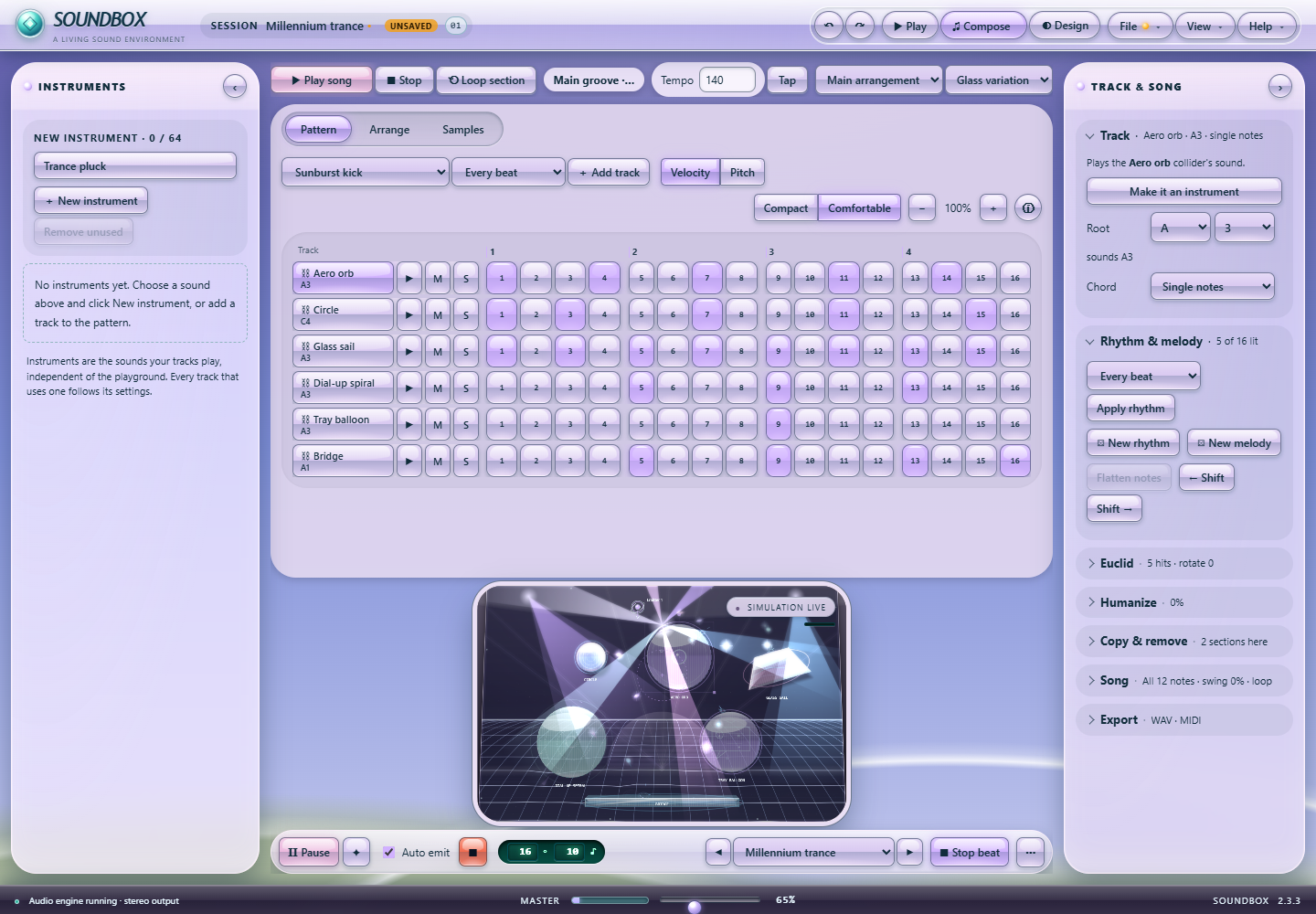
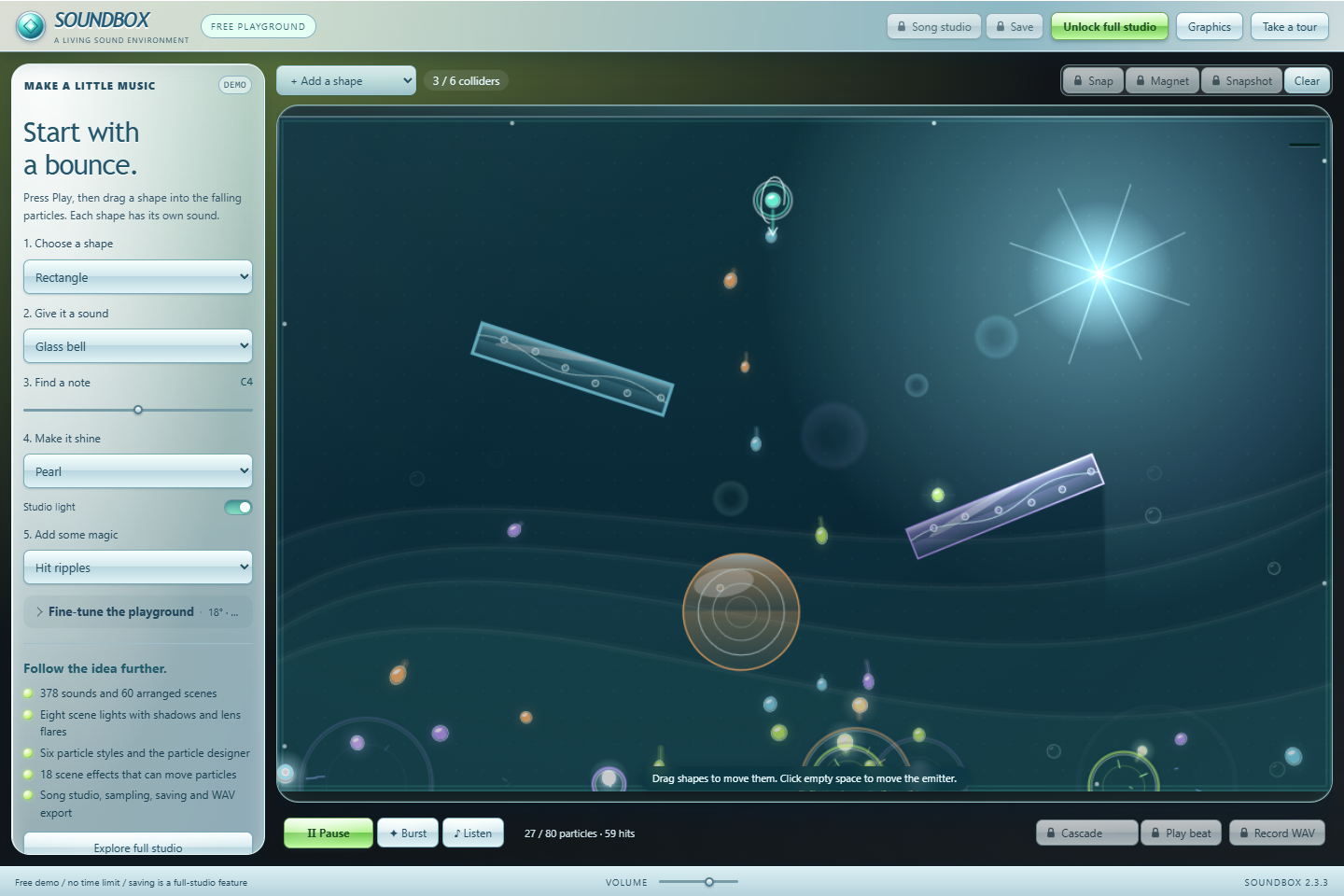
Actual screenshots from a 2.3 preview build; the studio plays on its GPU stage with GPU visuals on. Every feature is explained on the feature tour.
Fountain plaza — A new Aero scene: a fountain and a water jet toss droplets between lily pads that bob on the beat, while Aero jet streams carry the spray. Click the image to see every detail.CRT arcade by night — A new early retro scene in the Liquid Chrome theme with dark mode on, with the sound browser open: all 378 sounds by bank and category, here the early retro blips and zaps.Song studio — Tracks, a song key, Velocity and Pitch editing and the track editor, in the Millennium trance arrangement.Free demo — The same pearl-and-glass style with one simple panel, ten sounds and five basic shapes. Includes its own tour and Graphics settings.
The screenshots show a 2.3 preview build. The free demo has no time limit; it includes one emitter, six placed colliders, up to 80 particles, ten sounds, five basic shapes, a studio light and two scene effects. Saving, recording, sampling and song tools require a license.
CHOOSE YOUR EDITION
Room to play. Space to grow.
Play the free demo for as long as you like on your own computer. When you want the whole studio, unlock it with one payment: a lifetime key for US$100 or a 3-month key for US$30. No subscription.
Soundbox is a standalone Windows desktop application. It is not currently a VST, AU or AAX plugin. You can export a WAV recording to bring your ideas into another music application.
Can I use my own sounds?
Absolutely. The full studio can import audio, capture live input and slice recordings into samples. Use recordings you own or have permission to use. Built-in recorded sound credits are included with Soundbox.
Can I customize the interface and mix?
You bet. Soundbox includes 14 interface themes, each with a dark mode, 11 signature palettes, 14 UI colors, three glass finishes, 27 playground backgrounds (22 of them animated), 19 particle styles, 14 collider finishes, saved personal looks, knobs or sliders, precise values and a dedicated mixer. Press Customize in the site header to try the themes on this website, too, or explore the feature tour.
Do I need a powerful graphics card?
No. Computers with hardware-accelerated WebGL2 draw the playground on the graphics card, and GPU visuals add refracting glass, soft shadows and bloom at Full and Ultra quality. Everywhere else the Canvas 2D stage draws the same scenes, and Graphics → Display lets you choose. Graphics settings never change how particles move or sound.
How does activation work?
A license key unlocks the full studio on one computer at a time. Soundbox checks the key online when it activates and about every 15 minutes while the studio is open; after a successful check the studio keeps opening without a connection for 3 days. Moving to another computer can wait up to 24 hours. The demo never needs a connection. Activation help.
What happens if I replace my computer?
You can deactivate the old computer from Soundbox. For a lost or broken computer, contact support for help with a device reset. Reinstalling Windows on the same computer keeps your activation; a new motherboard needs a reset from support. More answers are in the FAQ.
Are the sketches on this page the actual application?
No. They are small interactive illustrations: the playground sketch has two synthesized voices and the Song studio sketch has four. The tour film and screenshots show the actual application. Full-studio features require an activated license; the free Windows demo provides the simplified playground described above. The sketches do not use your microphone or collect a device identity.
THERE’S SO MUCH MORE TO DISCOVER
Your sound. Your glass desktop.
60 arranged scenes. 378 sounds. 62 collider types. 14 interface themes. Take the complete feature tour.