THE FEATURE TOUR · SOUNDBOX 1.0

A little playground.
A whole world of sound.

Build an instrument out of pure motion. Give it a rhythm, shape every voice, and wrap it all in your very own glass desktop. Here’s everything inside.

378sound characters
60arranged factory scenes
62collider types
18living scene effects

Everything on this page is in the full studio of Soundbox 1.0. The free demo plays a smaller set; it arrives on January 12, 2027 (system requirements), and the keys and prices are on the Buy page. See what’s new.

01 / PHYSICS YOU CAN PLAY

Build a world that plays back.

Drag, resize and rotate glossy glass instruments. Aim up to eight independent emitters, shape the gravity and wind, and let every impact find its own place in the mix. The physics plays true, with real bounces, rolling, spin and gusty air, and in 2.3 the colliders themselves can move.

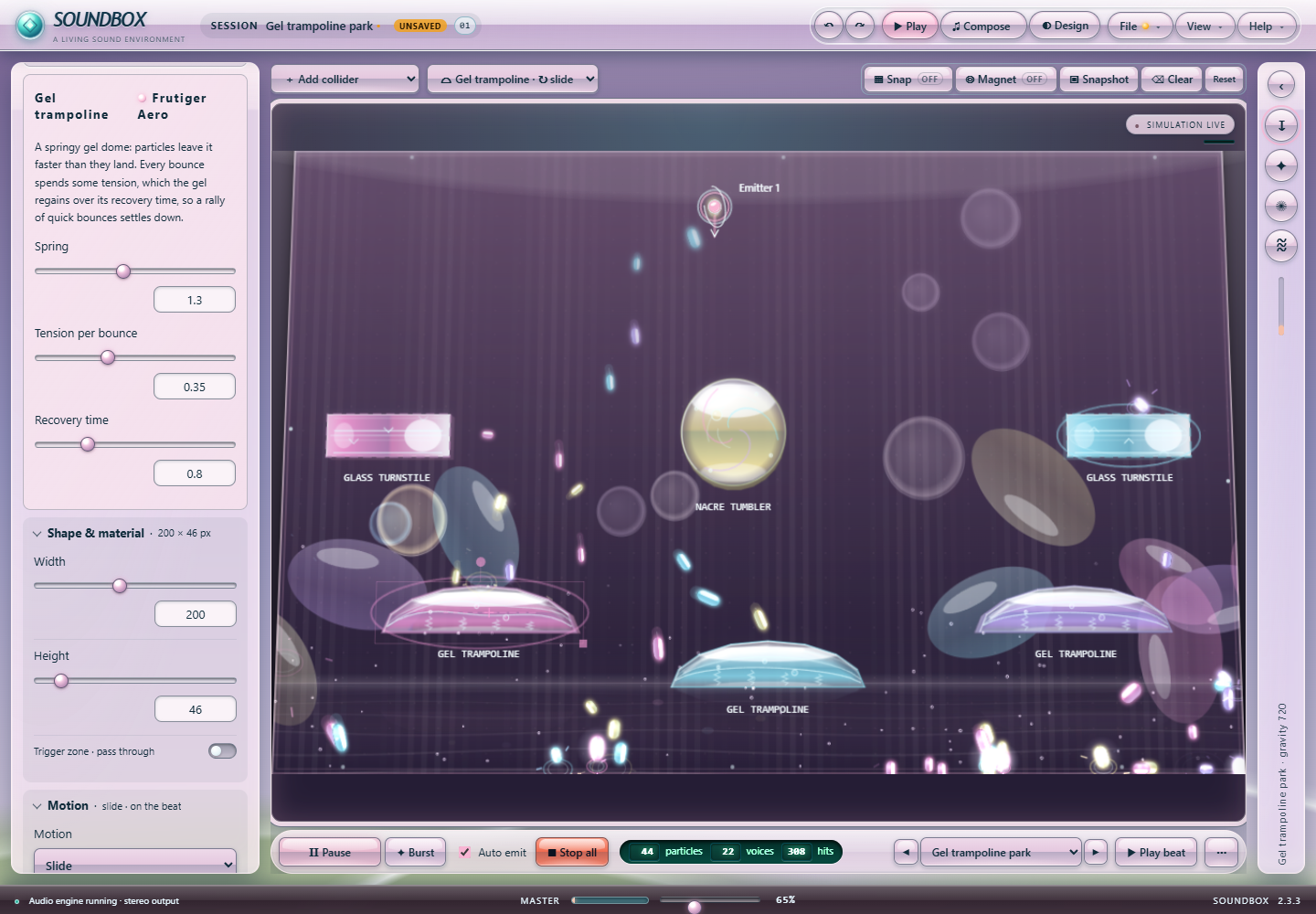
Soundbox 2.3 full studio playing Gel trampoline park: three gel trampolines, glass turnstiles and a nacre tumbler under drifting bokeh, with a sliding gel trampoline selected and its Motion settings (Slide, Follow the beat, four beats per cycle) in the Collider tab
A 2.3 preview build on its GPU stage: Gel trampoline park, with a gel trampoline that slides on the beat selected and its Motion block open in the Collider tab. Select the image to see it full size.

62 types. Individual personalities.

The 27 classics: rectangles, circles, triangles, ramps, diamonds, pentagons, hexagons, octagons, bridges, Pearl shells and Glass sails reflect; portals connect spaces; bumpers and accelerators launch particles; gravity wells and vortices curve their paths; bombs split particles and absorbers catch them. Add collider lists all 62 by family, with search, an icon and a description for each.

Aero colliders.

18 glossy nature-tech types: Gel trampolines that spring particles off faster than they land, Dew magnets, pulsing Water jets, Soap films that let slow particles through, tipping Lily pads, Chrome prisms, Bubble rings, Glass turnstiles, Aero lenses, swaying Kelp beds, Sunbeams that tune particles upward, Tide gates, Nacre tumblers, beat-pulsing Aero orbs, Fountains, Rain clouds, Koi ponds and Ripple pools.

Retro and Y2K colliders.

17 types from consoles and desktops: Pixel staircases, CRT bumpers, Arcade flippers, breakable 8-bit blocks, Cassette reels and Scanline sweepers; Floppy slots that write particles back out on the beat, Progress bars, Window frames, Recycle bins, Hourglass funnels, Cursor trail gates, Tray balloons and a Defragmenter; and Modem gates, Dial pads and a Dial-up spiral.

Colliders that dance.

Any collider can slide, orbit, spin, bob, swing like a pendulum or patrol between two points, at its own speed or a number of beats of the song per cycle. Particles ride moving colliders and get flung off them, and the selected collider shows its path on the stage. Motion is saved with the project and replays the same way every time.

Drag it while it plays.

Moving, rotating or resizing a collider while the scene runs pushes particles aside at the pointer’s speed instead of popping them through. A readout shows position, angle or size, Snap shows its guides, and a placement preview shows where a new collider lands.

Turn motion into an instrument.

Brake fields, Color gates, Pitch gates, Turn gates, Bubble lifts and Fan gates change the flow. Rainbow gates cycle color channels, Tide pools apply an oscillating force, and Echo gates reverse incoming velocity. Each type has its own glass animation; the boundary has a moving pearl border.

True to life.

Colliders keep their own Bounce and Friction, and rebounds match their setting at every height. Nothing slips through a thin edge, even at 3,000 pixels a second. Particles roll, spin and curve through the air, wind blows in gusts, and drag grows with speed, the way real things move.

Tools at your fingertips.

Snap colliders to a grid, pull particles around with the Magnet, Lock a collider in place, save a Snapshot or slow the whole world down with Time scale. Arrow keys nudge, Ctrl+D duplicates, Ctrl+C and Ctrl+V copy colliders between scenes, and ? lists every shortcut.

Fine control, happy accidents.

Adjust emission, spread, velocity, lifetime, size, bounce, damping and particle interactions. Shape emitter motion with modulation. Route sound by color channel, size and impact speed, with probabilities and voice limits for each instrument. Raise the particle limit as high as 20,000: when thousands of particles hit at once, swarm voices keep every collider sounding.

Scenery that breathes.

27 backgrounds, 22 of them animated: the 13 theme scenes (Sky glass, Classic desktop, Rolling hills, Aqua swirl, Spectrum display, Aurora glass, Media flow, Bubble horizon, Jelly float, Chrome grid, Coral reef, Leaf garden and Pixel land), plus Aqua waves, Aurora ribbons, Orbital rings, Bubble aquarium, Prism caustics, Sunlit lagoon, Trance sunrise, Glass meadow and Desktop daydream. Five still ones: Vista horizon, Crystal facets, Optical discs, Cloud atlas and Clean glass. The 13 theme scenes have night versions for dark mode; the rest darken with the palette. Set drift and intensity independently of physics, or let the background pulse with the song.

02 / LIGHT, WATER AND MAGIC

Scenes that come alive.

The FX tab holds 18 living effects, grouped by theme, and up to eight lights. They react to particles, hits, wind and the beat, and most of them can join the physics or simply look gorgeous.

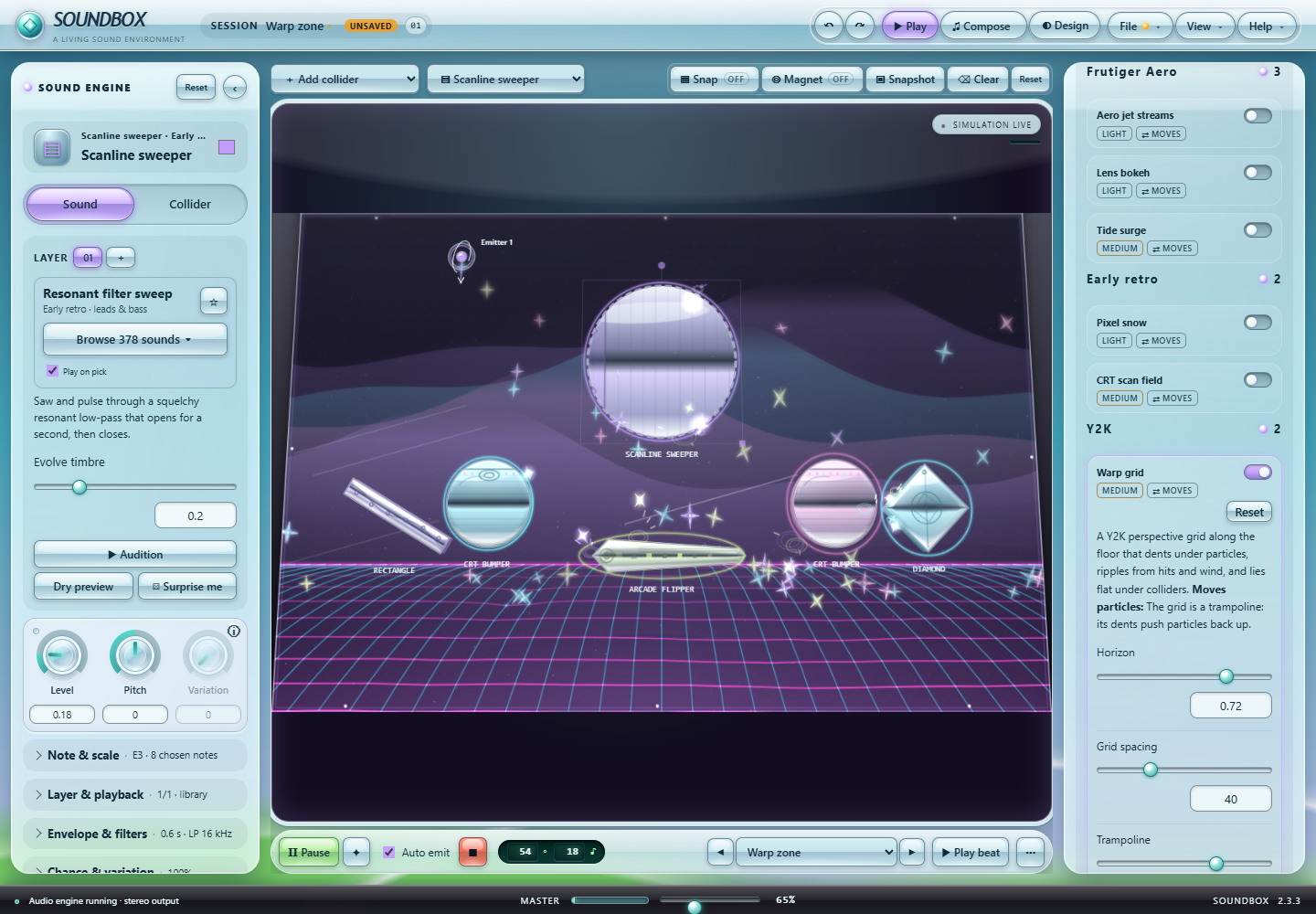
Soundbox 2.3 FX tab with effect cards grouped under Aero, Early retro and Y2K, the Warp grid switched on with its settings, over Warp zone with CRT bumpers and an arcade flipper above a glowing perspective grid
The actual 2.3 FX tab over Warp zone: effect cards grouped by theme with their drawing cost and ⇄ MOVES tags, and the Warp grid that bounces particles off its dents. Select the image to see it full size.

Eight new effects that push back.

New in 2.3, each with its own look and a physical side: Aero jet streams carry particles along curved currents, Lens bokeh orbs drift toward the lights and nudge particles away, Pixel snow builds slippery drifts, a CRT scan field shoves particles as it rolls by, the Warp grid dents and trampolines, Desktop icons turn into magnets and bumpers, a Tide surge lifts and carries, and Cursor trails click and knock particles.

The original ten.

A glossy Liquid pool with splashes and caustics, Hit ripples, a Bubble swarm that grows as it rises and pops with a sparkle, Aero critters (koi, butterflies or leaping dolphins), Plasma links that surge on the beat, Gel blobs, a swaying Meadow that blooms where particles land, glowing Mist, Glass shine and Mystify-style Screensaver ribbons.

Effects that push back.

Switch on Effects move particles and they join the physics: particles float in the pool and ride its waves, rings push them outward, bubbles bounce them, critters sweep them aside, gel holds them together and mist carries them along, scaled by Effect strength. Switched off, particles move and sound exactly as before.

Scene lights.

Place glow orbs, stage spots, sunbeams and disco prisms with their own color, reach, aim and beam. They breathe, orbit, sweep, flicker, wander or follow the particles, cast soft shadows from colliders, rim-light their edges, make particles sparkle and add lens flares. They can flare on hits, pulse with the beat or take the color of the last particle.

Drawn by your graphics card.

With hardware-accelerated WebGL2, Soundbox draws the playground on the graphics card. GPU visuals turn colliders into refracting glass and add soft-shadow lighting, bloom, color grades for each theme, GPU water, gel and mist, and shader backgrounds; Automatic switches them on at Full and Ultra quality. Off draws the classic picture, and Compatibility keeps the Canvas 2D stage.

A playground with depth.

Preferences → Display → Depth tilts the stage toward a horizon: backdrops move in parallax layers, colliders get lit side faces, floor reflections and contact shadows, far particles shrink and soften in the haze, scene lights sit in front of, on or behind the plane, and the GPU stage keeps the selected collider sharp with a depth of field. Alt-drag nudges the camera. Off is exactly the flat picture, and the physics never changes.

Three modes, one stage.

The header switches between Play, Compose and Design (Ctrl+1, 2, 3). Compose is the Song studio with the playground still running in a live strip below the step grid; Design is Customize with the themes, colors, backdrops, particles and colliders in the side panels while the stage stays in view. The panels fold to slim rails, every list is searchable, and every dialog shares one frame that reads clearly on all fourteen themes, day and night.

Drawn for every computer.

Preferences → Display → Scene effects draws everything, skips the heavy effects, or turns them off, and lighting has its own quality steps. On older computers, Lite and adaptive quality draw effects in a simpler form without ever changing how particles move.

03 / EVERY VOICE HAS A PLACE

From a single droplet to a full mix.

378 sounds, 31 categories.

The library combines 24 recorded characters and 354 procedural synth sounds. New in 2.3, three banks of original synthesized sounds: Aero (86: water drips and pours, glass taps, bubbles, gel, chrome, birds, soft keys and bells, interface blips and a drum kit), Early retro (93: pulse and triangle leads and basses, 4-op FM, noise drums, coin, jump and zap blips, modems, floppies, tape and PC speaker) and Y2K and retro desktop (89: startup and shutdown swells, dings, pops, window whooshes, mail, dial-up, organizers, polyphonic ringtones and trance stabs). No samples, and no real product’s sounds reproduced. The 30-sound Aero 2000s collection adds trance plucks, Euro pads, sunset keys, glow vibes, bouncing basses, a complete drum kit, nature textures and glossy interface sounds. The 20-sound Aero / Y2K collection adds login chimes, pearl keys, glass percussion, watery arpeggios, soft choirs, deep bass and iridescent sweeps. Recorded sounds include impacts, percussion, footsteps and designed effects, with bundled source credits.

Find it in a second.

Each layer names its sound with its bank and category, with a ☆ to keep favorites. Browse opens the whole library as collapsible groups, with ★ Favorites and Recently used on top and instant search over names, descriptions and categories. Listen with ▶, Shift+Enter or Alt+hover before you pick, and steer it all from the keyboard. Song studio picks its instruments from the same list.

Layer, route and evolve.

Use multiple sound layers per collider. Choose collision, continuous, combined or sequencer-only playback. Pick each layer’s note by name and octave and see the note you will hear, or let collisions choose from your own set of notes, at random or as an arpeggio. Shape attack, decay, filters, probability and evolving variations. Preview a voice, mute or solo it, or route MIDI to a connected instrument.

A mixer for every collider.

Balance channel level and stereo pan, mute and solo, and independent reverb and delay sends. Shape the master with bass and treble, reverb, delay time and feedback. Effects use sliders, and voice protection keeps dense collision bursts under control.

Rooms that ring true.

Choose a reverb space: Glass hall, Studio room, Bright plate, Cathedral or the Classic 2.1 room. Soft hits play quieter and darker, like real struck objects, and a look-ahead limiter keeps the master clean at −1 dBFS. In 2.3 the master goes up to 200%: up to 100% nothing changes, above it the level rises evenly to +15 dB, and the limiter keeps it free of clipping and crackle. Procedural sounds render at up to 48 kHz for crisp, full-bandwidth highs.

Your recordings belong here.

Import audio into sample pools, choose random, no-repeat, shuffle-bag or round-robin takes, or explore granular playback. Custom samples start with variation off; recorded sounds can keep their original pitch. Save individual layer settings in My sounds.

04 / A BOUNCE BECOMES A BEAT

Give your idea a shape.

Every playable factory scene opens with an arranged song: its own tempo, sound palette, accents and variations. Press Play beat beside the preset selector, or open Song studio and press Play song. The particle and song transports stay independent, so you can layer them whenever you like, or link them together.

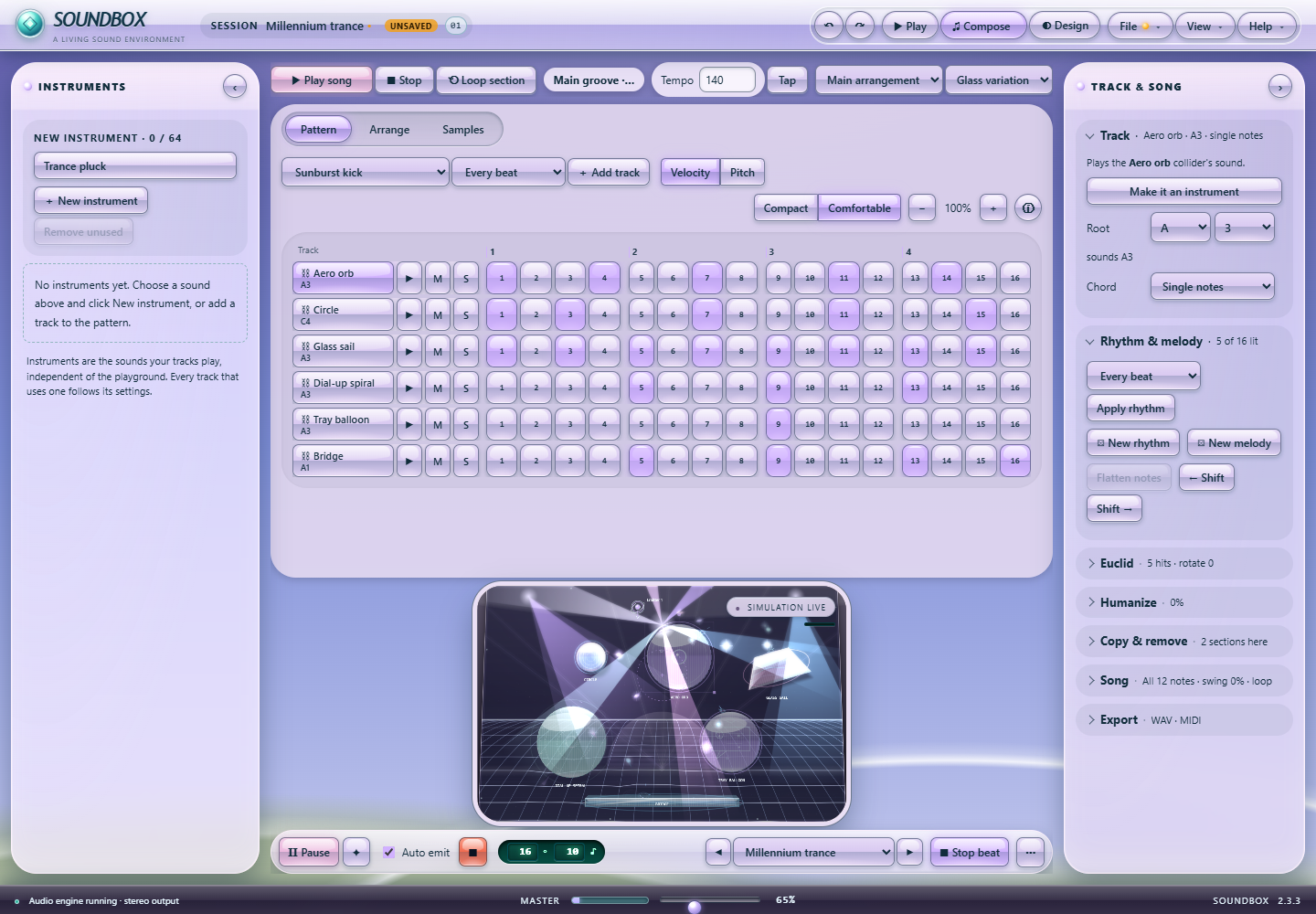
Soundbox 2.3 Song studio: the Millennium trance arrangement with six tracks, Velocity and Pitch editing, and the selected-track editor
The actual 2.3 Song studio playing Millennium trance: tracks, a song key, Velocity and Pitch editing and the track editor. Select the image to see it full size.

Instruments, melodies and chords.

Add instrument tracks from the whole library, independent of colliders, or borrow a collider’s sound. Sequence 16 steps in 4/4 at 30–240 BPM with velocity on every step; switch to Pitch to give each step its own note in the song’s key. Play chords, apply or generate rhythms and melodies, and shift, duplicate or copy tracks across sections.

Stacked arrangements.

Order sections with bar lengths and transposition and delete them right from their cards. Stack up to eight arrangements that play together, each with mute and repeat. The Instruments page sets each sound’s note, level, pan and length for every track that plays it.

Link playground, note for note.

Switch on Link and the playground plays along with the song: every note sends a particle on a clean arc that touches its collider as the note sounds, within about two thousandths of a second. Colliders light up with their instruments, and the song stays the only sound, so nothing plays off the beat.

Studio tools.

Solo any track, spread hits evenly with Euclid, loosen timing and velocity with Humanize, tap in a tempo, and practice with a metronome and one-bar count-in. Loop the section you are editing, undo and redo every step, then Export MIDI with one track per instrument, chords and melodies included.

Sample the moment.

Capture the last 2, 4 or 8 seconds of master output, or enable live input. Import a recording, divide it into 4, 8 or 16 equal slices, audition pads, and turn slices into studio instruments and tracks. Record the complete master mix to WAV.

05 / YOUR OWN GLASS DESKTOP

Find your desktop. Keep your look.

From Aero Gel to Pocket LCD, dress the whole instrument around you, by day or by night. Try the themes right here: the website version changes this site and stays in your browser.

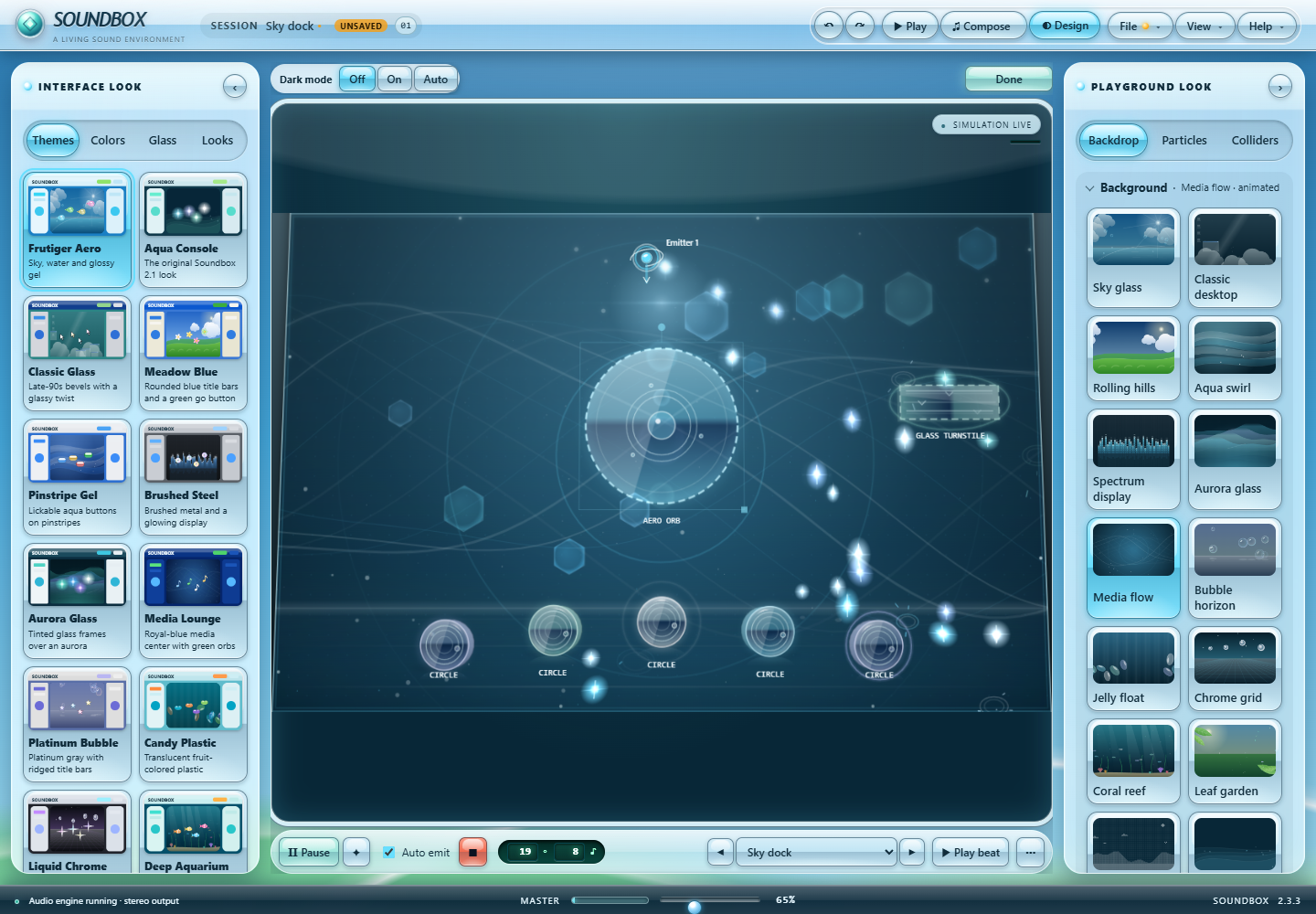
Soundbox Customize dialog on its Themes tab, with the interface theme cards from Aero Gel to Media Lounge
The actual 2.3 Customize panel, open on its Themes tab. The website offers a smaller interactive selection. Select the image to see it full size.

14 interface themes.

Turn-of-the-millennium desktops with a glossy Aero twist: Aero Gel, Glass Console, Classic Glass, Meadow Blue, Pinstripe Gel, Brushed Steel, Aurora Glass, Media Lounge, Platinum Bubble, Candy Plastic, Liquid Chrome, Deep Aquarium, Eco Garden and Pocket LCD. Each restyles the title bar, panels, buttons, knobs, dialogs and scrollbars, and brings its own background, particle symbol and collider finish.

Dark mode, everywhere.

Off, On or Match my computer, or the ☾ Dark button in the status bar. Every theme and palette, even your own edited colors, drops to calm, low-glare tones with bright accents and readable text, and the playground shows its night side: moons, stars, fireflies, a starfield or a backlit LCD.

Particles your way.

19 particle styles, from pearls, soap bubbles and crystal shards to water droplets, desktop icons, petals, jelly beans, tropical fish and LCD pixel art. Pick a trail, color by channel, speed or rainbow, let particles shrink, grow or pulse, and add a flash on every hit and impact sparks. Droplets and fish face their flight, and soft particles squash when they land.

11 palettes. 14 colors.

Start from one of 11 signature palettes, which recolor the current theme and keep its playground, or let Surprise me mix a fresh, harmonious look. Then color the window, dialogs, playground, header, Sound and Physics panels, buttons, primary actions, knobs, meters, reflections and two text surfaces, with color pickers or precise hex values. Automatic ink adapts to the surface, with manual text and higher contrast options.

Glass, chrome and atmosphere.

Choose Crystal glass, Frosted pearl or Liquid chrome, and one of 14 collider finishes, from glossy gel and brushed steel to candy plastic and LCD pixels. Adjust glass, reflection, blur and rounding; pair any background with dots, lines or pixel crosses, and watch it live in the preview. Slow console reflections, a floating logo and button ripples have separate switches. Reduced motion follows both the app and your system.

Knobs or sliders. Your precision.

Switch between rotary knobs and sliders. Type exact values, use up to six decimal places on continuous controls, and make fine or ultra-fine adjustments with Shift or Alt. Controls respect supported ranges; discrete values stay whole numbers.

Save a signature style.

My looks stores up to 12 named appearances on this computer. Keep customization locked while loading other scenes or projects. Colors, backgrounds, motion and surface settings travel with projects and support Undo/Redo. Graphics settings independently control quality, frame rate and render resolution.

06 / 60 WAYS TO BEGIN

Find a groove that feels like you.

Each scene keeps its characteristic physics layout and adds an editable musical starting point. From slow orbital patterns to bright garage and glass percussion, every arrangement has its own rhythm. The four showcase scenes arrived in 2.1 and bring two scene effects and their own lights each. The 22 scenes at the end are new in the 2.3 preview, in Aero, early retro and retro desktop collections, with the new sounds, colliders, collider motion and effects. The preset menu groups them all and finds one as you type. Blank remains an empty canvas.

First song

A bright desktop pop arrangement.

110 BPM · Glacier palette

Cascade

A cascading glass three-against-four groove.

108 BPM · Glacier palette

Orbit

A slow satellite waltz over a four-beat pulse.

76 BPM · Lilac palette

Rain

A crisp liquid breakbeat with offbeat droplets.

134 BPM · Glacier palette

Alien garden

A playful green jelly-funk conversation.

93 BPM · Citrus palette

Broken satellites

A fractured chrome electro beat.

142 BPM · Rose palette

Crystal caverns

A crystalline half-time bell pattern.

84 BPM · Glacier palette

Deep space

A sparse orbital pulse with long luminous tails.

62 BPM · Lilac palette

Portal playground

A call-and-response portal shuffle.

122 BPM · Lilac palette

Crystal desktop

A sparkling login-pop motif.

116 BPM · Glacier palette

Tidal screensaver

A slow tidal dub with floating arpeggios.

72 BPM · Glacier palette

Prism promenade

A glossy four-on-the-floor promenade.

126 BPM · Citrus palette

Y2K night drive

A midnight notification-garage rhythm.

132 BPM · Rose palette

Aqua desktop

A sunlit chord-hop with a chiming reply.

90 BPM · Glacier palette

Bubble elevator

A buoyant ascending flute-and-tine bounce.

102 BPM · Citrus palette

Pearl pinball

A punchy rubber-pop pinball break.

138 BPM · Rose palette

Seaside rhythm

A brushed coastal groove with a skipping tine melody.

112 BPM · Citrus palette

Lagoon keys

An electric-piano lagoon with syncopated answers.

96 BPM · Glacier palette

Submarine drift

A submerged bass heartbeat and airy organ.

64 BPM · Glacier palette

Glass rain

A bright glass shower in interlocking phrases.

128 BPM · Lilac palette

Neon breakwater

A neon pulse break with a glass-clap backbeat.

136 BPM · Rose palette

Chromatic falls

A gated mallet ostinato with color-changing responses.

118 BPM · Citrus palette

Slow motion bells

A suspended bell lullaby above a quiet engine bed.

58 BPM · Lilac palette

Workshop shuffle

A tactile desktop shuffle with wood and chrome.

106 BPM · Rose palette

Reactor garden

A low cyber-garden dub with shield accents.

82 BPM · Citrus palette

Supernova garden

A spacious bloom beat with scattered crystal replies.

98 BPM · Rose palette

Pinball nebula

A bouncing mallet break with metallic answers.

124 BPM · Lilac palette

Gravity loom

A woven five-note glass pattern over gentle pulses.

88 BPM · Glacier palette

Clockwork cascade

A precision tine-machine with a ticking turnaround.

120 BPM · Citrus palette

Prism orchard

A blooming pentatonic canopy with offbeat shimmer.

104 BPM · Citrus palette

Vortex choir

A rotating choir with a slow breathing pulse.

68 BPM · Lilac palette

Warp drive

A fast launch-gate electro rhythm.

144 BPM · Rose palette

Midnight percussion

A tight late-night glass-and-wood breakbeat.

130 BPM · Lilac palette

Particle garden

A bubbling botanical groove with playful syncopation.

100 BPM · Citrus palette

Dolphin lagoon

A lounge groove of congas and soft keys, with dolphins and koi splashing through a sunny lagoon.

SHOWCASE · 92 BPM · Ocean palette · Liquid pool & dolphins

Euro sunrise

A 2000s trance anthem: supersaw stabs, a bouncing bass and a glossy lead over a four-on-the-floor kick.

SHOWCASE · 136 BPM · Lilac palette · Plasma links & glass shine

Glass garden

Hand drums, glass harmonica and a vibraphone arpeggio in a garden of birdsong and ripples.

SHOWCASE · 84 BPM · Forest palette · Meadow & butterflies

Startup daydream

A bright desktop-pop beat with droplet piano, liquid plucks and a startup chime that says hello.

SHOWCASE · 120 BPM · Aero palette · Bubble swarm & ribbons

Fountain plaza

A splashy plaza groove of bubble kicks, droplet hats and a steel-pan answer.

NEW · FRUTIGER AERO · 94 BPM · Aero palette · Aero jet streams

Gel trampoline park

A springy gel-funk bounce with a wobbling bass.

NEW · FRUTIGER AERO · 127 BPM · Rose palette · Lens bokeh

Kelp forest

A slow underwater sway of tabla, kelp bass and a misty flute.

NEW · FRUTIGER AERO · 74 BPM · Ocean palette · Lens bokeh

Sunbeam conservatory

A bright greenhouse of harp runs, bells and rain on glass.

NEW · FRUTIGER AERO · 86 BPM · Citrus palette · Aero jet streams

Tide harbor

A rolling harbor shuffle with tide kicks and a chrome bass.

NEW · FRUTIGER AERO · 111 BPM · Aero palette · Tide surge

Sky dock

A glossy interface pop beat: hover blips, toggles and a dock that bounces.

NEW · FRUTIGER AERO · 121 BPM · Glacier palette · Lens bokeh

Meadow breeze

A lazy meadow lilt of nylon strings, handpan and garden calls.

NEW · FRUTIGER AERO · 80 BPM · Forest palette · Aero jet streams

Pixel castle

A running chiptune platformer beat with coin blocks and a triangle bass.

NEW · EARLY RETRO · 150 BPM · Ocean palette

CRT arcade

A neon arcade break of lasers, flippers and a score tally.

NEW · EARLY RETRO · 139 BPM · Cyber lime palette · CRT scan field

Cassette dub

A warm tape-delay dub with FM steel and a sliding bass.

NEW · EARLY RETRO · 78 BPM · Ember palette

Chip snowfield

A gentle chip waltz of FM bells, triangle flute and timpani.

NEW · EARLY RETRO · 91 BPM · Glacier palette · Pixel snow

Warp zone

A breakneck filter-sweep run with double-time flipper kicks.

NEW · EARLY RETRO · 162 BPM · Violet palette · Warp grid

Radio dial

A late-night broadcast of static, speech chips and a pulse bass.

NEW · EARLY RETRO · 70 BPM · Graphite palette · CRT scan field

Classic desktop shuffle

A clicky desktop shuffle of windows, menus and a recycle crunch.

NEW · Y2K & RETRO DESKTOP · 117 BPM · Aero palette · Desktop icons

Dial-up handshake

A chirping modem rhythm of keypad tones and handshakes.

NEW · Y2K & RETRO DESKTOP · 125 BPM · Rose palette · Cursor trails

Millennium trance

A pumping millennium trance anthem with offbeat bass and gated pads.

NEW · Y2K & RETRO DESKTOP · 140 BPM · Lilac palette · Warp grid

Pocket organizer

A tidy pocket-gadget groove of stylus taps, beams and a waltz ringtone.

NEW · Y2K & RETRO DESKTOP · 101 BPM · Forest palette · Cursor trails

Defrag disco

A disk-drive disco of seek chatter, stepper arps and crunchy kicks.

NEW · Y2K & RETRO DESKTOP · 123 BPM · Violet palette · Desktop icons

Boot sequence

A start-up procession of self-test beeps, wizard steps and a login chord.

NEW · Y2K & RETRO DESKTOP · 107 BPM · Aero palette · CRT scan field

Screensaver starfield

A weightless screensaver drift of starfield pings and tooltip glints.

NEW · Y2K & RETRO DESKTOP · 68 BPM · Ocean palette · Lens bokeh & cursor trails

Inbox overflow

A frantic notification rush of mail drops, pops and toasts.

NEW · Y2K & RETRO DESKTOP · 133 BPM · Glacier palette · Desktop icons

Ringtone mall

A shiny mall-atrium bop of pagers, keypads and a glass cowbell.

NEW · Y2K & RETRO DESKTOP · 114 BPM · Rose palette · Lens bokeh
07 / KEEP THE HAPPY ACCIDENTS

A studio that stays yours.

Projects and personal libraries.

Save complete projects with samples and arrangements; Ctrl+S writes back to the file you opened. Drop a project or audio files on the window, and if Soundbox ever closes unexpectedly, it offers your unsaved work back. Keep full scenes in My presets, reusable layers and ★ favorite sounds in My sounds, and export preset backups to move your work between computers. Both libraries search and sort, and Undo removal brings back an entry you deleted. Use Undo/Redo and confirmed resets while experimenting.

Projects with their own icon.

.soundbox project files wear their own glossy Aero Gel document icon and open in Soundbox with a double-click, Open with or a drop onto the program; with unsaved changes, Soundbox asks first. The full edition registers this for your own Windows account when it starts, and the new ⚙ Settings dialog (Ctrl+,) turns it off again.

Choose your kind of smooth.

Graphics offers Lite, Economy, Full and Ultra, plus adaptive quality that eases effects when frames drop and Test this computer to pick a level. Choose 24–240 fps or display refresh, 50–200% rendering resolution, and separate settings for lighting, particle detail, trails, sparks, background animation, interface glass and scene effects. Stage renderer picks the GPU stage or the Canvas 2D stage, and GPU visuals choose Automatic, Off or Enhanced. Graphics never changes how particles move or sound. Reduced motion freezes decorative effects while musical physics stays playable.

The free playground.

The unlicensed Windows demo has ten sounds, five basic shapes, one emitter, up to six placed colliders, 80 particles, its own studio light, three particle styles, Hit ripples and a Bubble swarm; the other styles and effects play a short preview. It includes guided tours and graphics settings with unlimited play time. Saving, sampling, recording and Song studio require a full-studio license.

Windows standalone.

Soundbox runs as a 64-bit Windows application, not a VST, AU or AAX plugin. The portable build can check for, download and verify its own updates. A full-studio license works on one computer at a time; activation and its checks need the internet, and the studio keeps opening offline for 3 days after a successful check. See licensing for complete terms.

Licensing details · Version notes · Contact SoundBoxQD

Every image on this page shows a 2.3 preview build; the homepage tour film shows 2.2 footage.